building-my-portfolio-website-with-nextjs.md (7158B)
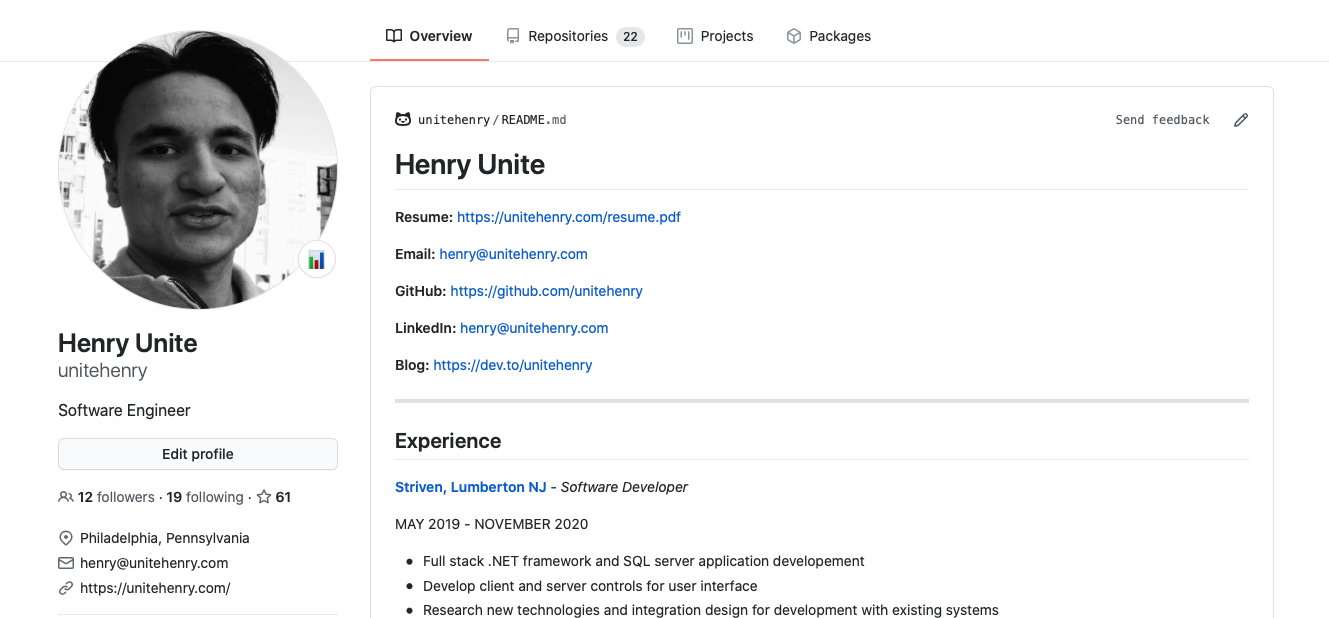
1 --- 2 title: Building My Portfolio Website With Nextjs 3 description: Building a portfolio website with Nextjs. 4 --- 5 6 # Building My Portfolio Website With Nextjs 7 8 2020-11-20 9 10 It's time for a new portfolio website! This time I decided to use Next.js to generate my static site with these principles in mind: 11 12 1. Take a [README](https://github.com/unitehenry/unitehenry/blob/master/README.md) markdown file of my resume and convert it to a static homepage 13 2. Use [semantic HTML](https://www.w3schools.com/html/html5_semantic_elements.asp) with global styles for easy customization 14 3. Adding [next pages](https://nextjs.org/docs/basic-features/pages) will append links to the homepage 15 16 ## README Conversion 17 18 The core concepts of this project are built on the foundation of these methods: 19 20 1. Bootstrap a [create-next-app](https://nextjs.org/docs/api-reference/create-next-app) 21 2. Use the [getStaticProps](https://nextjs.org/docs/basic-features/data-fetching) to generate HTML from the README with [showdown](https://github.com/showdownjs/showdown) 22 3. Use [dangerouslySetInnerHTML](https://reactjs.org/docs/dom-elements.html) for SEO optimization 23 24 ### Getting Started with Next 25 26 We can start bootstrapping our application using the [create-next-app](https://nextjs.org/docs/api-reference/create-next-app) npm script. 27 28 ``` 29 $ npx create-next-app 30 ``` 31 32 ### Generating HTML from README 33 34 Using [getStaticProps](https://nextjs.org/docs/basic-features/data-fetching) and [showdown](https://github.com/showdownjs/showdown), we can generate some HTML to use for our site generation. 35 36 ``` 37 export async function getStaticProps() { 38 const path = require('path'); 39 const fs = require('fs'); 40 const { Converter } = require('showdown'); 41 const converter = new Converter(); 42 43 function parseREADME() { 44 return new Promise((res) => { 45 fs.readFile(path.join(process.cwd(), 'README.md'), (err, data) => { 46 const readme = data.toString(); 47 const html = converter.makeHtml(pReadme); 48 res(html); 49 }); 50 }); 51 } 52 53 const html = await parseREADME(); 54 55 return { 56 props: { html }, 57 }; 58 } 59 ``` 60 61 ### Serving HTML optimized for SEO 62 63 The key to using [dangerouslySetInnerHTML](https://reactjs.org/docs/dom-elements.html) with next.js is that we want to ensure the content of our HTML is served as static content for SEO. 64 65 ``` 66 return ( 67 <div> 68 <Head> 69 <title> {title} </title> 70 <link rel="icon" href="/favicon.ico" /> 71 </Head> 72 73 <main dangerouslySetInnerHTML={{ __html: html }} /> 74 75 <footer> 76 77 </footer> 78 </div> 79 ); 80 ``` 81 82 ## Semantic Styling 83 84 After your content is being injected in the page, you should be staring at a wall of black and white text like this: 85 86 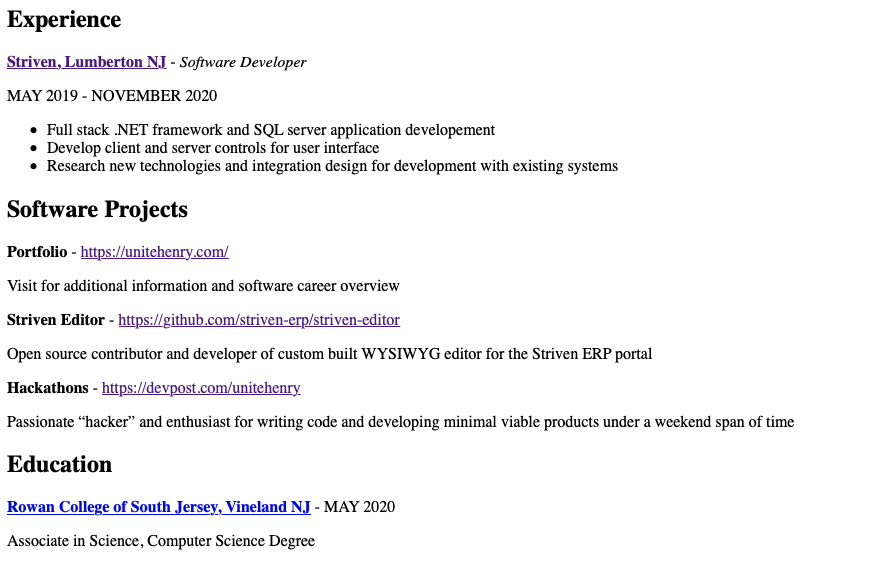 87 88 Using the [global.css](https://nextjs.org/docs/basic-features/built-in-css-support) file provided by next, we can globally style semantic elements like this: 89 90 ``` 91 body { 92 /* CSS Styles */ 93 } 94 95 main { 96 /* CSS Styles */ 97 } 98 99 main hr { 100 /* CSS Styles */ 101 } 102 103 main strong { 104 /* CSS Styles */ 105 } 106 107 main p { 108 /* CSS Styles */ 109 } 110 111 main h1, main h2, main h3, main h4, main h5, main h6 { 112 /* CSS Styles */ 113 } 114 115 main ul, main ol { 116 /* CSS Styles */ 117 } 118 119 main li { 120 /* CSS Styles */ 121 } 122 123 main a { 124 /* CSS Styles */ 125 } 126 ``` 127 128 ## Page Extensibility 129 130 One of the design concepts I wanted to implement was the idea that you could add a next page in the pages directory and a navigation link be appended to the homepage. 131 132 Taking advantage of the the [getStaticProps](https://nextjs.org/docs/basic-features/data-fetching) function, we can use node to read the directory, exclude unrelated files, and generate links in our homepage. 133 134 ``` 135 // CONFIG['pageExcludes'] = [ 'app', 'api', 'index'] 136 137 function getPages() { 138 return new Promise((res) => { 139 fs.readdir(path.join(process.cwd(), 'pages'), (err, data) => { 140 const pageFiles = data.filter((f) => { 141 return !CONFIG['pageExcludes'].filter((ex) => f.includes(ex)).pop(); 142 }); 143 144 res(pageFiles.map((p) => p.replace('.js', ''))); 145 }); 146 }); 147 } 148 149 const html = await parseREADME(); 150 const pages = await getPages(); 151 152 return { 153 props: { html, pages }, 154 }; 155 ``` 156 157 ``` 158 <footer> 159 <div id="pages"> 160 { pages.map((p) => p ? <a key={p} href={`/${p}`}>{ p }</a> : null } 161 </div> 162 </footer> 163 ``` 164 165 ### Gathering my Blog Post Data 166 167 With this feature, I can now create unique CMS pages to extend my static site. Let's create a blog page to fetch my DEV posts. 168 169 I'll be using the [axios](https://github.com/axios/axios) library to make a request to the DEV api, gather my posts data, and send those props to the page for static site generation. Again, taking advantage of the [getStaticProps](https://nextjs.org/docs/basic-features/data-fetching) hook. 170 171 ``` 172 // pages/blog.js 173 174 export async function getStaticProps() { 175 const axios = require('axios'); 176 177 function getArticle() { 178 return new Promise(async (res) => { 179 const req = await axios({ 180 method: 'GET', 181 url: 'https://dev.to/api/articles?username=unitehenry' 182 }); 183 184 if(req['data']) { 185 try { 186 const data = req['data']; 187 res(data.map((article) => { 188 return { 189 title: article['title'], 190 description: article['description'], 191 url: article['url'], 192 date: article['created_at'], 193 image: article['cover_image'] 194 }; 195 })); 196 } catch(e) { 197 res([]); 198 } 199 } else { 200 res([]); 201 } 202 }); 203 204 } 205 206 const articles = await getArticle(); 207 208 return { 209 props: { articles } 210 } 211 } 212 ``` 213 214 ``` 215 <section> 216 217 { (articles.length === 0) && <p>No Blog Posts</p>} 218 219 { 220 articles.map(({ title, description, date, url, image }) => { 221 return ( 222 <article key={title} className={style['blog-article']}> 223 { image ? <img src={image} /> : null} 224 <div className={style['blog-article-content']}> 225 <h2>{ title }</h2> 226 <p>{ description }</p> 227 <a title="Read Article" className={style['blog-button']} href={url} target="_blank">Read Article</a> 228 </div> 229 </article> 230 ); 231 }) 232 } 233 234 </section> 235 ``` 236 237  238 239 ## Bootstrapping of my Repository 240 241 If you want to see the source code or fork this repo and generate your own static site, I've created a [GitHub repository](https://github.com/unitehenry/unitehenry) and [documented in detail](https://github.com/unitehenry/unitehenry/wiki) how to customize the code for your own static portfolio site. 242 243 ### GitHub Trick 244 245 As a side note, there is a [GitHub trick](https://docs.github.com/en/free-pro-team@latest/github/setting-up-and-managing-your-github-profile/managing-your-profile-readme) that will take your README and display it on your GitHub profile as well. 246 247